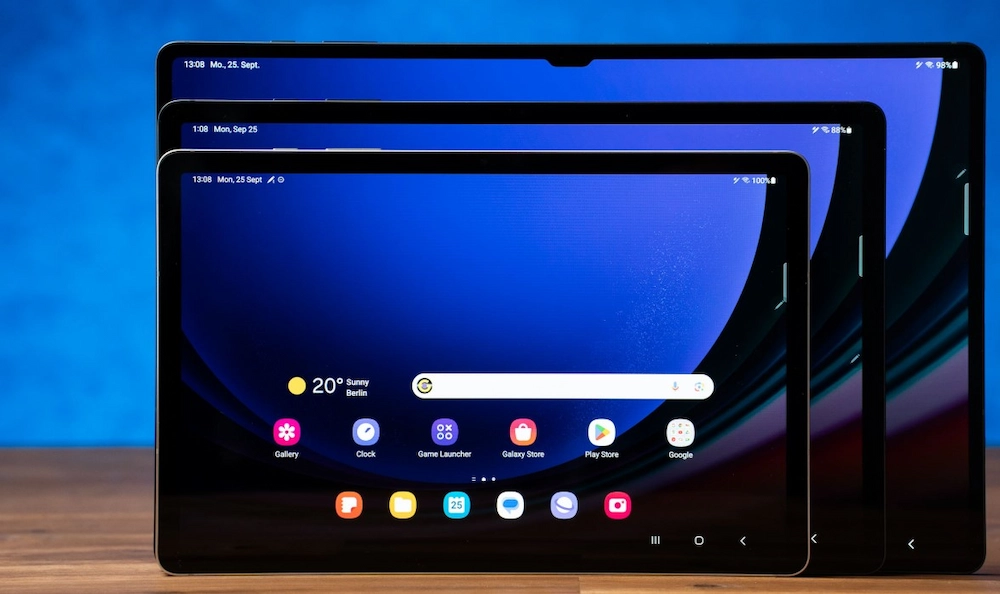
A dropped Samsung Galaxy Tab doesn’t always look catastrophic. Sometimes the glass cracks. Sometimes the screen goes black. Sometimes it still turns on, but touch stops working or the display starts flickering.
At Hillside Phone Repairs, we regularly see Galaxy Tabs that customers are told are “not worth fixing” when in reality, the damage has simply been misdiagnosed.
Samsung tablets use a range of advanced display technologies, including AMOLED and high-resolution LCD panels, and what breaks when they’re dropped is often far more complex than just glass.
In this article, we’ll explain what actually fails inside a Galaxy Tab, why professional diagnosis matters, and what makes Samsung tablet screen repairs more technical than most people expect.
Understanding the internal components of a Samsung Galaxy Tab is essential to grasp why screen repairs can be intricate and why a simple crack on the surface might mask deeper issues. The device’s screen assembly is a sophisticated combination of layers, including the glass, touch digitiser, and display panel, all of which can be individually or collectively affected by impact.
Moreover, damage to the tablet can extend beyond the screen itself. Drops can cause internal hardware issues such as battery damage, motherboard faults, or camera malfunctions, which may not be immediately visible but significantly impact device performance.
Professional repair services like Hillside Phone Repairs employ specialised tools and techniques to carefully disassemble the tablet, assess all potential damage, and address both visible and hidden problems. This comprehensive approach ensures that your Galaxy Tab is restored to full working order, not just superficially fixed.
Additionally, choosing a repair service that uses high-quality or original parts is crucial for maintaining the tablet’s performance and longevity. Inferior components can lead to recurring issues or reduced display quality.
Finally, understanding the model number of your Samsung Galaxy Tab can help in obtaining the correct replacement parts and repair procedures, as different models may have unique specifications and repair requirements.
By opting for expert repair services, you can ensure that your Samsung Galaxy Tab is handled with care, using the right parts and methods to solve both screen and other hardware or software issues, ultimately extending the life of your device.
Understanding Samsung Galaxy Tab Screen Technology
Samsung uses different screen constructions across its Galaxy Tab range, which is why repairs vary significantly by model.
Common Galaxy Tab Display Types
- AMOLED displays (Galaxy Tab S series)
- High-resolution LCD displays (Galaxy Tab A series)
- Fully laminated assemblies on higher-end models
In many cases, the glass, touch layer, and display panel are fused, meaning damage to one layer often affects the others.
This is why “glass-only” repairs are rarely suitable on Samsung tablets.
Why Screen Construction Matters for Repairs
The construction of the screen assembly directly impacts how repairs are carried out. For instance, AMOLED displays, known for their vibrant colours and deep blacks, are more delicate and expensive to replace than LCDs. The fusion of layers in fully laminated assemblies means that any crack or damage often necessitates replacing the entire display unit rather than just the glass. This complexity requires skilled technicians equipped with specialised tools to carefully disassemble and reassemble the device without causing further damage.
Impact on Repair Cost and Time
Due to the intricate nature of these screen technologies, repair costs can vary widely. AMOLED screen replacements typically cost more compared to LCD replacements because of the higher price of the components and the precision required during installation. Additionally, the repair process for fully laminated screens can be more time-consuming, as technicians must ensure dust-free environments and precise alignment to maintain the device’s original display quality and touch sensitivity.
Model-Specific Repair Considerations
Each Galaxy Tab model comes with unique design features — such as different adhesive types, screen thicknesses, and connector placements — which influence repair strategies. For example, the Galaxy Tab S series often features more advanced display technologies and slimmer profiles, making repairs more delicate. In contrast, the Galaxy Tab A series, aimed at budget-conscious users, may have simpler screen assemblies but still require professional handling to ensure proper functionality after repair.
The Role of Professional Diagnosis
Because damage can affect multiple layers and components within the screen assembly, professional diagnosis is essential. Technicians can identify whether the issue is limited to the glass, the digitiser, the display panel, or even internal hardware like flex cables and connectors. This thorough assessment helps avoid unnecessary repairs and ensures that all underlying problems are addressed to restore the tablet to full working order.
Ensuring Quality with Genuine and High-Quality Parts
Using genuine Samsung parts or high-quality aftermarket components is vital for preserving the tablet’s performance and longevity. Inferior parts can lead to issues such as reduced touch responsiveness, colour inaccuracies, or even further damage. Reputable repair services source parts that meet strict quality standards and provide warranties to give customers confidence in their repair.
Summary
Understanding the different screen constructions across Samsung Galaxy Tab models highlights why screen repairs are complex and model-specific. Whether dealing with AMOLED or LCD technology, fully laminated assemblies, or fused layers, professional repair services equipped with the right expertise and tools are crucial to achieving reliable, long-lasting results. If your Galaxy Tab screen is damaged, seeking expert help ensures your tablet is properly fixed and continues to deliver the quality experience you expect.
What Actually Breaks When a Galaxy Tab Is Dropped
1. The AMOLED or LCD Panel (Even If the Glass Looks Fine)
On Galaxy Tab S models, the AMOLED panel itself is often the first component to fail.
Signs include:
- Black ink-like patches
- Purple or green lines
- Sections of the screen that stay dark
- Flickering or uneven brightness
AMOLED panels are incredibly sharp and vibrant, but they are also extremely fragile. Once damaged, they cannot be repaired, only replaced.
Because the AMOLED panel is a delicate and integral part of the display assembly, any impact that causes internal damage to this layer will affect the overall screen functionality, even if the outer glass appears intact. This hidden damage often leads to confusing symptoms for users who might assume their screen is fine just by looking at it. Repairing or replacing the AMOLED panel requires specialised knowledge and tools to ensure the new panel integrates perfectly with the rest of the device components.
2. Touch Digitiser Failures
Sometimes the display looks fine, but:
- Touch doesn’t register
- Only part of the screen responds
- The screen starts pressing itself (“ghost touch”)
This is usually caused by:
- Micro-fractures in the digitiser layer
- Damage to flex cables
- Connector stress from impact
These faults often worsen over time if left untreated.
The touch digitiser is a sensitive layer responsible for detecting your finger’s movements on the screen. Damage to this layer can cause erratic behaviour, which may seem like software glitches but are in fact hardware faults. In some cases, the digitiser may partially fail, resulting in an inconsistent touch response that makes using the tablet frustrating or impossible. Early diagnosis and repair can prevent further damage to the underlying display and ensure your tablet remains fully functional.
3. Frame Distortion (The Silent Screen Killer)
One of the most common issues we see at Hillside Phone Repairs is frame micro-bending.
Even a short fall can:
- Slightly twist the aluminium chassis
- Create uneven pressure points
- Cause replacement screens to crack prematurely if not corrected
Before installing a new screen, we inspect and correct frame alignment, a step many low-cost repairers skip.
Frame distortion is a subtle but critical problem because the tablet’s frame maintains the structural integrity of the entire device. When the frame is bent or warped, it can put uneven pressure on the screen assembly, leading to cracks or touchscreen failures shortly after repair. Proper frame realignment requires precision tools and experience to restore the tablet’s original shape, ensuring that any new screen installed will last as long as possible.
4. Connector & Flex Cable Damage
Samsung Galaxy Tabs rely on ultra-thin flex cables connecting the display to the mainboard.
Drops can cause:
- Partial cable tears
- Lifted connectors
- Intermittent screen behaviour
These issues are often misdiagnosed as “screen failure” when the real problem is connector-related.
Flex cables are delicate components that transmit signals between the screen and the tablet’s logic board. Damage to these cables or their connectors can cause symptoms similar to screen damage, such as flickering, unresponsive touch, or black screens. Diagnosing flex cable issues requires opening the device and testing connections carefully. Repairing or replacing these cables can often restore full functionality without the need for a costly screen replacement.
In addition to these common failures, drops can also cause other issues such as battery damage, motherboard faults, or camera malfunctions, which may not be immediately apparent but can affect device performance. Comprehensive professional diagnosis ensures that all damage is identified and addressed, giving your Samsung Galaxy Tab the best chance at a full recovery.
Why Samsung Galaxy Tab Screen Repairs Are More Complex
AMOLED Displays Require Precision
AMOLED panels:
- Are expensive
- Are heat-sensitive
- Must be installed with perfect alignment
Incorrect installation can result in:
- Display burn-in
- Colour inconsistency
- Shortened screen lifespan
Because AMOLED technology relies on organic compounds that emit light when an electric current is applied, these panels are more sensitive to heat and pressure compared to traditional LCDs. This sensitivity means that during the repair process, technicians must use precise temperature controls and careful handling to avoid damaging the delicate components. Even slight misalignment during installation can cause uneven pressure distribution, leading to premature wear or display issues such as ghost images or burn-in effects. Therefore, only experienced technicians with the right tools should attempt to replace AMOLED screens to ensure the device retains its vibrant display quality and longevity.
Fully Laminated Assemblies Mean Full Replacement
On most Galaxy Tabs:
- The glass is bonded to the display
- Separation risks permanent damage
That means professional repair involves:
- Controlled heat application
- Specialist separation tools
- Dust-free reassembly
Fully laminated screens enhance display clarity and reduce reflections by bonding the glass directly to the display panel. While this design improves visual performance, it also complicates repairs since the layers cannot be separated without risking damage. Attempting to replace only the glass often leads to irreparable harm to the display underneath. Repair technicians must therefore replace the entire screen assembly, which includes the glass, digitizer, and display panel as one unit. This process requires a clean, dust-free environment to prevent contamination during reassembly, ensuring the repaired screen maintains its original touch sensitivity and image quality.
Model Variations Matter
A Galaxy Tab A repair is not the same as a Galaxy Tab S7 or S8 repair.
Each model has:
- Different display thickness
- Different adhesives
- Different connector layouts
Experience with Samsung tablets specifically is critical.
Samsung offers a wide range of Galaxy Tab models, each engineered with unique design specifications tailored to different user needs. The Galaxy Tab A series, for example, is designed with cost-effectiveness and durability in mind, often featuring thicker displays and simpler construction. In contrast, the Galaxy Tab S7 and S8 models boast slimmer profiles, advanced AMOLED screens, and more complex internal layouts to support high-end features like pen support and 5G connectivity. These differences mean that repair procedures vary significantly between models, affecting everything from disassembly techniques to the types of replacement parts used. Technicians familiar with the nuances of each Galaxy Tab model can provide faster, more reliable repairs, avoiding common pitfalls such as damaging delicate connectors or using incompatible adhesives.
Why DIY Samsung Tablet Repairs Often Fail
DIY tablet repairs frequently result in:
- Cracked replacement screens
- Torn flex cables
- Dust trapped under the display
- Adhesive failure weeks later
Tablets are harder to repair than phones because:
- They have larger screens
- More flex during handling
- Tighter tolerances
We often see devices brought in after a failed DIY attempt that are more expensive to fix than they should have been initially
Attempting to fix a Samsung Galaxy Tab screen at home might seem like a cost-saving option, but the complexity of these devices often leads to unintended damage. The large size of the screen means it is more susceptible to bending and pressure during disassembly, increasing the risk of cracking the new screen or damaging internal components. Additionally, the delicate flex cables that connect the display to the motherboard are easily torn if not handled with precision tools and experience.
Another common issue with DIY repairs is contamination. Without access to a clean, dust-free environment, particles can become trapped between layers of the display during reassembly, resulting in unsightly spots or touch sensitivity problems. Furthermore, improper application of adhesives can cause screens to lift or separate over time, compromising the tablet’s durability and waterproofing.
Professional repair technicians have access to specialised tools, replacement parts in stock, and the know-how to carefully disassemble and reassemble the device without causing further harm. They also offer warranty coverage on repairs, providing peace of mind that your Samsung Galaxy Tab will be restored to reliable working order.
Is Samsung Galaxy Tab Screen Repair Worth It?
In many cases, absolutely.
Galaxy Tabs are:
- Powerful productivity devices
- Expensive to replace
- Still highly usable after professional repair
Screen replacement is usually far cheaper than buying a new tablet, especially for Galaxy Tab S models.
Beyond cost savings, repairing your Galaxy Tab screen helps reduce electronic waste, making it an environmentally friendly choice. Many users find that after a quality screen replacement, their tablet functions as well as new, with restored display clarity and touch responsiveness.
Considering the investment in a Samsung Galaxy Tab and the convenience of retaining your data, apps, and settings, opting for a professional screen repair is often the smartest decision. Additionally, reputable repair services can often source genuine or high-quality aftermarket parts, ensuring your device maintains its original performance and longevity.
Before deciding, it’s important to assess the extent of the damage and the repair cost. For minor cracks or touch issues, screen repair is usually straightforward and affordable. However, if your tablet has suffered extensive internal damage or hardware failures, you might need to weigh repair costs against the benefits of purchasing a new device.
Many repair centres in Australia, including Hillside Phone Repairs, offer free diagnostics and transparent pricing, helping you make an informed choice about your Samsung Galaxy Tab screen repairs.
Why Choose Hillside Phone Repairs for Galaxy Tab Repairs
At Hillside Phone Repairs, we specialise in:
- Samsung Galaxy Tab A repairs
- Galaxy Tab S, S6, S7, S8 screen replacements
- AMOLED display handling
- Frame alignment and structural inspection
We don’t guess. We diagnose, explain, and repair properly the first time.
Book Your Samsung Galaxy Tab Screen Repair Today
If your Galaxy Tab has a cracked screen, black patches, touch issues, or display flicker, bring it to Hillside Phone Repairs for a professional assessment.
Your tablet is worth repairing when it’s done right.